Document upload and verification in scoreio: verify participants without emailing scans
In disciplines with age categories, a participant's age and identity aren't a formality — they're the foundation of a fair result. That's why organizers always need supporting documents: a passport, a birth certificate, an ID card. For a long time document upload lived outside the platform — scans flew into email and messengers, got lost, were mixed up between teams, and had to be collected by hand into separate folders. We moved that process inside scoreio. Now, when registering an athlete, you can require a document scan and its number right in the form, and the organizer receives everything centrally — with access controls and no manual hassle.
How it used to work
Documents were always needed, but the platform didn't collect them — so every organizer improvised.
- Scans arrived through different channels. One coach emailed a passport, another sent a photo over a messenger, a third shared a cloud link. Merging it all into a single list before the start was a job of its own.
- No way to match a document to a participant. A file like "scan_001.jpg" with no context said nothing: whose passport is this, which team, which registration — all sorted out by hand.
- Age was checked on trust. Without convenient access to the document, age-category verification turned into a formality, and disputed cases surfaced only on the floor.
- Personal-data risk. Document scans spread across private chats and inboxes with no access control whatsoever. Once a child's passport was sent, there was no way to track who had seen it.
In sum: slow, unreliable, and unsafe — all during the busiest period right before a competition.
What changed

Document collection became part of the registration itself. The upload requirement is enabled via brand settings — in some countries it's mandatory, in others it stays optional.
Upload a scan right during registration
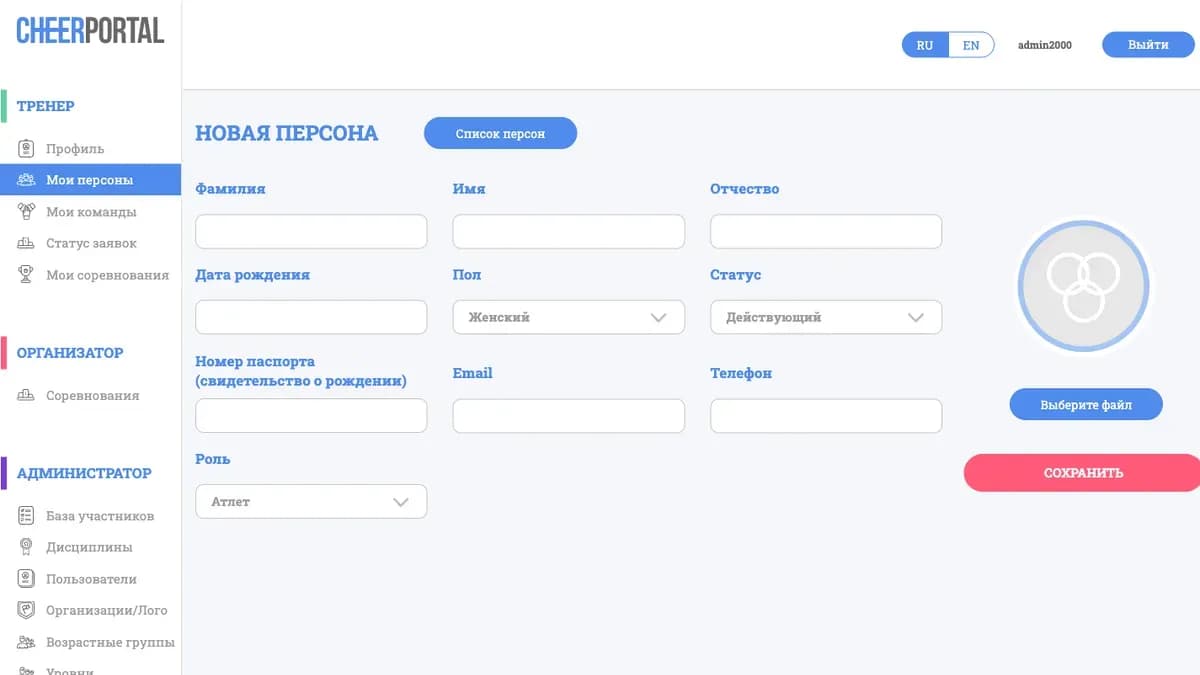
When registering an athlete, the form can request a document scan — a passport, birth certificate, or ID card, depending on the rules. The document is attached to the specific athlete, so it's always clear whose it is and which registration it belongs to. No separate channels: the file is in its place from the start.
Document number
Alongside the scan you can collect a document number as a separate field. This simplifies reconciliation and official reporting: the organizer sees both the image and the details in one place, without reading the number off a picture.
Supported formats and size
Upload is built for the real files participants have:
- formats PDF, JPG, JPEG, PNG — a ready scan or a phone photo alike;
- size up to 10 MB per file, enough for a clear, legible scan.
Access only for those entitled to it
A document is personal data, and access to it is restricted. A scan can be opened only by the owning coach (the one who submitted the registration and is responsible for the athlete) and an administrator — and only with a permission check. The document doesn't wander through chats: it lives in the system, visible only to those whose role allows it.
Configurable per country and ruleset
Whether a document is required is decided by a brand setting. Where the rules make age and identity confirmation mandatory, upload can be made required; where they don't, it can stay optional or be turned off. The same scoreio serves both strict and lenient rulesets.
What this gives you

- All documents in one place. Supporting scans are collected centrally and tied to a specific athlete — no more merging email, messengers, and cloud links by hand.
- Real age and identity verification. A document at hand turns a formality into genuine verification — disputed cases are closed before the start, not on the floor.
- Less manual hassle. Forwarding, renaming, and foldering scans is gone — the file is in place, with its number alongside.
- Personal-data access control. A scan is visible only to the owning coach and an admin, with a permission check. That reduces leak risk compared to forwarding through private chats.
- Country-level flexibility. The upload requirement is configurable to your rules — where the law or federation demands it, it's enforced automatically.
- Support for any participant file. PDF, JPG, JPEG, PNG up to 10 MB — a scanner or a phone camera both work.
Where this solves a real problem
A youth tournament with strict age groups. The rules require confirming every child's age. Coaches used to send birth certificates over a messenger, and before the start the organizer manually reconciled dozens of photos. Now uploading a scan is mandatory at registration: the document is tied to the athlete, the number is right there, and age verification runs calmly and before the competition begins.
An international event requiring an ID card. Participants from several countries need an ID card and its number. The brand setting enables required upload for that scope, and a registration simply isn't considered complete without the document. The organizer gets a single, verifiable list — no chat threads, no guesswork.
Sensitive personal data under control. A federation handles minors' documents and is obliged to restrict access to them. In scoreio a scan is visible only to the owning coach and the administrator. Documents don't spread across private chats — they stay in the system under access control.
Frequently asked questions
Which documents can I require at registration? A passport, birth certificate, or ID card — depending on the rules. Alongside the scan you can also collect the document number as a separate field.
Is it mandatory for everyone? No. The upload requirement is enabled via brand settings. In some countries it's mandatory, in others it stays optional or is turned off — to match your rules.
Which formats and file size are supported? PDF, JPG, JPEG, and PNG, up to 10 MB per file. A ready scan or a phone photo of the document both work.
Who can see an uploaded document? Only the registration's owning coach and an administrator, and only with a permission check. The scan is not available to other participants and is not forwarded through outside channels.
Why a document number if there's already a scan? The number speeds up reconciliation and official reporting: the organizer sees both the image and the details in one place, without reading digits off a picture.
How to get started
Document upload and verification is enabled through your brand settings — part of scoreio's flexible white label configuration, where required fields are defined per country and discipline. Documents pair well with the extended team roster: both athletes and, where needed, other roster members can be confirmed.
Want to collect supporting documents centrally and securely? Request a demo or a pilot launch of scoreio — we'll configure document requirements for your rules and show how participant verification runs from upload to check.